
The Midnight Jackpot
Game Features
18 paylines
Wild
Scatter
Free spins
Quest with progressive jackpot
Quest Slots
Be the first to complete the quest and you'll win the jackpot! All players in the same coin value participate for the same jackpot. See details in Jackpot Quest section.
How to Play
This slot game has 5 reels and 18 paylines.
During regular play the objective is to obtain a winning combination of icons on one or more of the paylines.
Payouts for each winning combo are summed to calculate the total win amount for each game round.
Winning combos consist of matching icons in the correct positions on a payline, starting from the first reel on the left and continuing along the payline from left to right.
To create a winning combo the matching icons must be on adjacent reels without other icons interrupting the pattern.
Only the highest win per payline is paid.
This slot has a fixed bet of 1 coin per payline for a total of 18 coins bet per spin.
You can choose the value of the coins being played by using the arrows on either side of the COIN VALUE display within the game (see Menu Bar section for info).
See the paytable within the game for the payline patterns, the minimum number of icons required to form winning combos as well as the coin payouts for each type of icon.
When you've set your bet amount, click the SPIN button to spin the reels (see Game Buttons section for info).
Wild

Wild symbols starting from the leftmost reel create their own winning combos with payouts as per the paytable.
When the Wild symbol appears anywhere except the leftmost reel, it completes winning combos and multiplies regular winnings for the following icons:
 x2
x2
 x2
x2
 x2
x2
Scatter

With 2 or more Scatter symbols in any position on the reels, your bet amount will be multiplied to calculate your scatter win:
2 symbols = x5
3 symbols = x15
4 symbols = x50
5 symbols = x100
Scatter win is added to any regular winnings in the spin in which the scatter was activated.
Free Spins

With 2 or more Free Spin symbols in any position on the reels, you'll be awarded free spins:
2 symbols = 5 free spins
3 symbols = 15 free spins
4 symbols = 50 free spins
5 symbols = 100 free spins
The coin value cannot be changed during free spins. If the game is closed before the free spins have been played out, the next time any game is opened your unfinished free spins will be loaded and you will be required to play them out before proceeding to any other game.
The number of free spins remaining and the total amount won overall is displayed within the game. This amount is shown purely for your information as individual winnings are credited to your balance after each free spin.
If additional free spins are won, the game stops and the new free spins are added to the free spins you have remaining. By clicking the SPIN button, free spins will continue and will be played out automatically.
If a game feature such as a bonus game is activated, the feature will interrupt the free spins. When you've finished playing out the game feature, your remaining free spins can be continued by clicking the SPIN button.
Jackpot Quest
The first player to finish the quest wins the jackpot!Your goal is to reach midnight before the other players in a race against time.
All players using the same coin value are competing in the same quest for the jackpot.
When the Hourglass symbol appears on the center reel, you'll move closer to midnight:

The Hourglass symbol will move your clock counter from 15 to 60 minutes forward each time it appears:
A progress report of all participating players can be viewed using the following button:

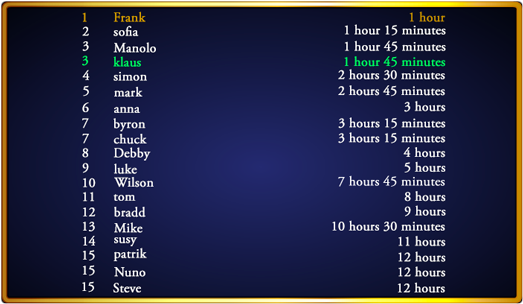
Click anywhere outside the panel to close the user list and return to the game.
The first player to reach midnight finishes the quest and wins the jackpot.
The jackpot win is added to any regular winnings in the spin in which midnight is reached.
At the end of each quest, all clock counters get set to zero, the jackpot gets reset and a new quest begins!
Jackpot Balance Management
The jackpot in this game is incremented with 2.00% of every bet placed.
Each coin value has its own separate jackpot and increments are allocated based on the coin value being played.
When the jackpot balance increases or decreases, there can be a delay of up to 30 seconds in displaying the updated jackpot amount in the game. In the extremely rare case that the same jackpot is won twice within this brief period of time, the first jackpot win in chronological order will be paid out based on the jackpot balance at the time of the win and the second payout will be based on the remaining jackpot balance. If the first jackpot payout causes the jackpot balance to be reset, this will occur before the second payout is processed.
Because the timing of game events is tracked with finite precision, simultaneous jackpot wins are not technically possible. There will always be a chronological first and second jackpot winner, the first payout being based on the jackpot balance at the time of the win and the second being based on the remaining jackpot balance or the newly reset jackpot balance, if the first win caused the jackpot to be reset.
Jackpot payouts are always based on the latest jackpot balance stored on the remote game server at the time of the jackpot win. Through continued technical optimization, all efforts are made to ensure the smallest possible delay in the balance updates from the remote server to the display of the game on the end user's device.
Game Buttons
Within the game panel, the following buttons are present:
 |
The SKIP button allows you to skip game intros, previews and/or feature presentations. |
 |
The payline indicators are the buttons to the left and/or right of the reels. By mousing over the payline indicators, you can view the payline patterns. |
 |
The ? button opens the paytable to show you the payouts for winning combinations and explanation of game features. |
 |
The COIN VALUE buttons allow you to choose the value of the coins being played. |
 |
The AUTO button activates the autoplay feature. The number of spins shown on the AUTO button are played out automatically when the button is clicked. Clicking this button again will deactivate the autoplay feature before all spins have been played out. | |
The bet amount set at the time autoplay is activated will be used for each autoplay spin. As spins are played out, the AUTO button displays how many are remaining. |
 |
The SPIN button removes the current bet amount from your balance, spins the reels and generates the game results. During the spin, clicking anywhere on the reels will stop the animation and show the game results immediately. You can continue to bet the same amount as the previous spin by clicking the SPIN button. |
 |
When the reels are spinning the STOP button appears, allowing you to stop the reel animation and view the game results immediately.
|
 |
The RETURN TO GAME button appears at the end of game features such as bonus rounds or free spins and brings you back to the main game. |
Game Displays
Within the game panel, the following displays are present:
| TOTAL COINS: | Your total balance is converted into a number of coins based on the coin value that you are playing with. For example if your balance is 1,000.00 and you choose a coin value of 0.10 your TOTAL COINS display would be 10,000. When playing in demo mode, the TOTAL COINS display shows FUN. | |
| BET: | The total amount of money you have bet for the current spin. | |
| WIN: | The total amount of money you won with the current spin. |
Paytable Buttons
Within the paytable you'll find the following buttons:
 |
Allows you to select any page of the paytable. |
 |
Takes you to the next page of the paytable. |
 |
Closes the paytable and takes you back to the game panel. |
Menu Bar
The menu bar at the bottom of the game screen contains the following displays and buttons:

The BALANCE display shows the total amount of money available to make bets with, which is the sum of cash and playable bonus money.
The ARROW button to the left of the BALANCE display opens a panel showing the breakdown of balances (details below) and is only present when promotions are active on the website.
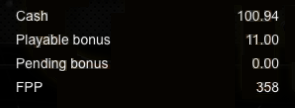
Cash:
money deposited on the website or bonus money that has been converted to real money after meeting wagering requirements.
Playable bonus:
money that can be used to make bets but cannot be withdrawn from the website until wagering requirements are met.
Pending bonus:
cannot be used to make bets or be withdrawn from the website until wagering requirements are met.
FPP:
loyalty points that are earned when playing games.

When playing in demo mode with a guest account, the balance section is replaced with a REGISTER NOW link which opens the registration form, allowing you to sign up on the website.

When playing in demo mode as a logged in user, the balance section is replaced with a WIN REAL MONEY! link which allows you to switch to real money mode.
 |
The AUTOPLAY button allows you to configure the various autoplay options (details below). | |

|
When autoplay is activated, the AUTOPLAY button turns into a STOP button, allowing you to deactivate the autoplay feature before all spins have been played out. |
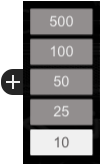 |
This panel opens when the AUTOPLAY button is clicked, allowing you to set the number of autoplay spins you want to play.
When you choose one of the numbers, autoplay spins begin immediately and the number shown on the AUTO button (see Game Buttons section) is updated.
The bet amount set at the time autoplay is activated will be used for each autoplay spin. As spins are played out, the AUTO button displays how many are remaining. |
The + button opens a panel of autoplay stop settings.
Within this panel you can define conditions in which autoplay will be stopped before all spins have been played out:
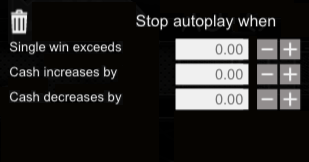
Single win exceeds:
any single win exceeding the amount you specify.
Cash increases by:
when your overall balance increases by the amount you specify during autoplay spins.
Cash decreases by:
when your overall balance decreases by the amount you specify during autoplay spins.

|
The RESET button within the panel clears all of the autoplay stop settings. |
If a game feature such as a bonus game or jackpot win is activated, autoplay will stop and must be restarted manually by choosing a new number of autoplay spins.
 |
The GAMES button opens a game menu, allowing you to load a new game. |
 |
The VOLUME button opens a panel which allows you to set the volume of the game audio. | |
 |
A single click on the VOLUME button will mute all game audio. Clicking the button again will restore the volume to its default setting. |
 |
The MENU button opens an internal menu containing links to the game guide and various other pages on the website. |
 |
The SETTINGS button opens a panel in which various game settings can be managed: |
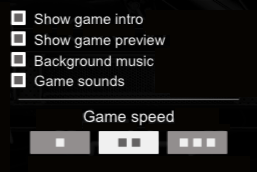
Show game intro:
option to show the game intro for the game in question during game load.
Show game preview:
option to show the game preview for the game in question during game load.
Background music:
option to mute just the background music for the game in question.
Game sounds:
option to mute just the game sounds for the game in question.
Game speed:
settings for the reel spin animation speed.
RTP
Game RTP: 97.94%
The RTP, or return to player, is the percentage of the total amount bet that gets paid out as winnings.
This percentage is based on the rules of the game, the probability of game events occurring and the "best play" strategy.
The RTP shown above is a theoretical number based on a large data set.
Individual results will vary.
Unless otherwise specified, Game RTP is inclusive of game features such as bonus games, free spins/hands, jackpot increments, etc.
For games with jackpots, see the Jackpot Balance Management section for specific info about the jackpot increment which is included in the overall Game RTP shown above.
General Information
The game features, settings and functionality are subject to the terms and conditions of this gaming website. Use of the game, whether in FUN mode or for real money, indicates agreement to such terms and conditions.
Any unfinished hands/rounds shall be placed in a "resumable" state and will be loaded automatically the next time any game is opened. A list of unfinished games is also available in the My Account section. A hand/round is considered unfinished if a) outstanding bets still need to be resolved or b) when reasonably possible, the server detects that the final game result was not displayed to the player even when all wins have already been paid.
Inactive login sessions on this gaming site will expire after 20 minutes.
Malfunction of the gaming hardware/software will render any and all affected game play and pays void; all affected bets will be reimbursed once appropriate verifications have been performed.